




- sports

- action

- cricket

- arcade

- racing

- adventure

- girls

- boys

- hot

- more

3D Car Simulator
- 91%
- 9%
- Favourite
- Share
- Report
- Full Screen




About this game
Introduction
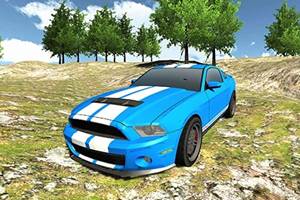
3D Car Simulator is a car game where you choose any of the three assigned cars, including an old car, a police car or a rally car and burn the tyres of your vehicle at top speed. Choose from available vehicles when the game provides a selection. Control a car through racing, stunt, parking, or route-based challenges. Use movement, timing, or object behavior influenced by the game’s physics.
How to Play 3D Car Simulator Game
Choose the available vehicle or route, then keep the car under control as the driving challenge begins.
Control speed and steering while reacting to turns, traffic, ramps, rivals, and obstacles along the route.
Use controlled steering and braking around difficult sections instead of relying only on maximum speed.
Complete the current car objective and use each successful attempt to improve your timing, accuracy, or overall result.
Controls
Keyboard: This free online car driving game includes very simple and easy controls like WASD or arrow keys to drive, Space bar to use handbrake, C to change camera, and E to turn on/off police car lights.
Main Features of 3D Car Simulator Game
Car Driving: Control a car through racing, stunt, parking, or route-based challenges.
Vehicle Control: Manage speed and steering through difficult sections.
3D Presentation: Play in a three-dimensional game environment.
Physics-Based Gameplay: Use movement, timing, or object behavior influenced by the game’s physics.
Keyboard Controls: This free online car driving game includes very simple and easy controls like WASD or arrow keys to drive, Space bar to use handbrake, C to change camera, and E to turn on/off police car lights.
Vehicle Selection: Choose from available vehicles when the game provides a selection.
Desktop Play: Supports desktop play using the controls described by the game.
Handbrake: Use the handbrake when tighter vehicle control is needed.
Visual Presentation: Uses the visual presentation or artwork described by the source.
Browser Play: Play directly in a supported web browser.